



console 是 JavaScript 内置的调试工具对象,提供了多种方法用于输出日志、警告和错误信息。常用的 console 方法包括:
console.log():输出一般信息。
console.info():输出信息,样式与 console.log 类似。
console.warn():输出警告信息,通常带有黄色背景。
console.error():输出错误信息,通常带有红色背景。
console.table():以表格形式展示数据,适合显示数组和对象。
一些好看的样式分享
1.好看的版本号
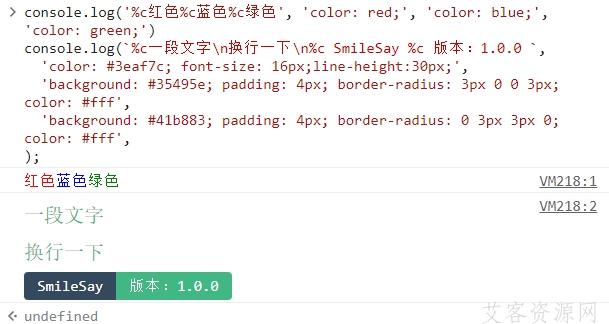
console.log('%c红色%c蓝色%c绿色', 'color: red;', 'color: blue;', 'color: green;')
console.log(`%c一段文字\n换行一下\n%c SmileSay %c 版本:1.0.0 `,
  'color: #3eaf7c; font-size: 16px;line-height:30px;',
  'background: #35495e; padding: 4px; border-radius: 3px 0 0 3px; color: #fff',
  'background: #41b883; padding: 4px; border-radius: 0 3px 3px 0; color: #fff',
);
2.表单输出
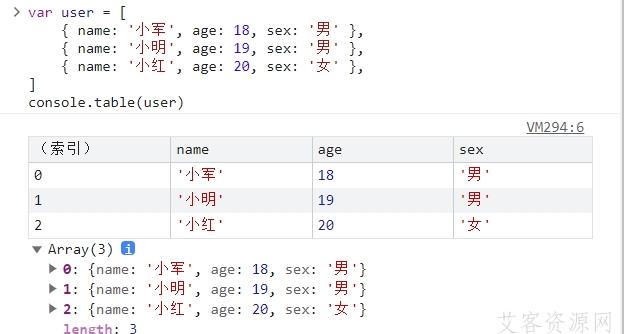
var user = [
    { name: '小军', age: 18, sex: '男' },
    { name: '小明', age: 19, sex: '男' },
    { name: '小红', age: 20, sex: '女' },
]
console.table(user)
3.自用得样式分享
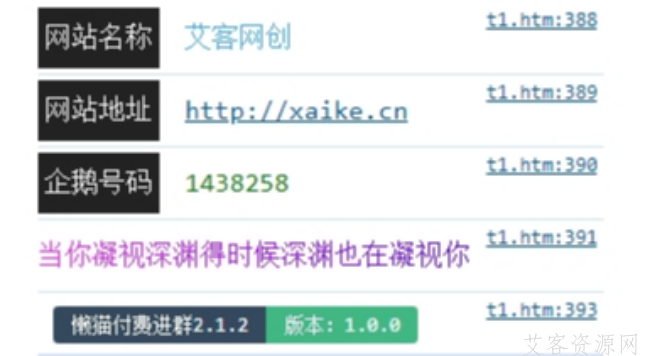
console.log("%c%c网站名称%c艾客网创","line-height:28px;","line-height:28px;padding:4px;background:#222;color:#fff;font-size:16px;margin-right:15px","color:#3fa9f5;line-height:28px;font-size:16px;");
console.log("%c%c网站地址%chttp://xaike.cn","line-height:28px;","line-height:28px;padding:4px;background:#222;color:#fff;font-size:16px;margin-right:15px","color:#ff9900;line-height:28px;font-size:16px;");
console.log("%c%c企鹅号码%c1438258","line-height:28px;","line-height:28px;padding:4px;background:#222;color:#fff;font-size:16px;margin-right:15px","color:#008000;line-height:28px;font-size:16px;");
console.log("%c%c当你凝视深渊得时候深渊也在凝视你","line-height:28px;","line-height:28px;padding:4px 0px;color:#fff;font-size:16px;background-image:-webkit-gradient(linear,left top,right top,color-stop(0,#ff22ff),color-stop(1,#5500ff));color:transparent;-webkit-background-clip:text;");

console.log(`%c %c 懒猫付费进群2.1.2 %c 版本:1.0.0 `,
  'color: #3eaf7c; font-size: 16px;line-height:30px;',
  'background: #35495e; padding: 4px; border-radius: 3px 0 0 3px; color: #fff',
  'background: #41b883; padding: 4px; border-radius: 0 3px 3px 0; color: #fff',
);
4.一个适合整体介绍的样式
/* 样式代码 */
var styleTitle1 = `
font-size: 20px;
font-weight: 600;
color: rgb(244,167,89);
`
var styleTitle2 = `
font-style: oblique;
font-size:14px;
color: rgb(244,167,89);
font-weight: 400;
`
var styleContent = `
color: rgb(30,152,255);
`

/* 内容代码 */
var title1 = '🌒 懒猫付费进群V4 '
var title2 = '懒猫网络第四版付费进群系统'

// => 读取配置型(在配置文件里配置这些会变动的网址)
var offiUrl = 'aike7809'
var content = `
版 本 号:2.1.2    【开发版本:2.1.3】
编译日期:2025-5-26 19:39:39
版权声明:
1. 懒猫付费进群V4版权完全属于 "艾客网络".
2. 懒猫付费进群V4中lm.js程序包,任何个人和机构在遵守下列条件的前提下授权永久使用:
    1)不进行任何形式的破解和裁剪,程序包完整引用
    2)保留此版权信息在控制台输出
我们保留对此版权信息的最终解释权.
🏠官网:  http://xaike.cn
📞微信:  ${offiUrl}
`
console.log(`%c${title1} %c${title2}
%c${content}`, styleTitle1, styleTitle2, styleContent)
收藏



停留在世界边缘,与之惜别